How to Make AI Text More Human?
There are multiple AI content writing tools online that help you write fast. The biggest advantage of these tools is that they save you time.
But there is one big problem with the content generated by these tools. The text written by these tools often sounds robotic. It feels flat and also lacks a human touch.
That is where the need to make AI text human comes in. Read on to learn how to make AI text human easily.
Why AI Text Sounds Robotic?
AI tools follow patterns. They do not think like humans. Because of this, their writing has some clear issues.
First, they repeat the same sentence style again and again. This makes the text boring. Second, they do not show real emotion. The tone feels dry.
Also, they use very formal and safe words. This removes personality from the content. On top of that, the flow often feels off. Sentences do not connect in a smooth way.
Because of all this, readers can easily tell the content is written by AI.
Humanizing AI Text - What it Means?
Humanizing AI text means making it sound like a real person wrote it. You keep the idea the same. But you change the tone, flow, and style.
Good human-like writing has:
-
Simple and clear words
-
Natural tone
-
Different sentence lengths
-
Smooth flow between ideas
-
A bit of emotion or personality
Best Approach to Make AI Text More Human
You should never publish raw AI content. Always edit it.
Start by reading the text once. Then fix awkward lines. Make sentences shorter and clearer. Add simple words. Also, connect ideas using basic transition words.
However, doing all this by hand takes time. That is where humanizing tools like SuperHumanizer help.
A smart approach to make AI text human is:
-
Use AI to write.
-
Then use a humanizer tool.
-
After that, do a final edit.
What Is SuperHumanizer?
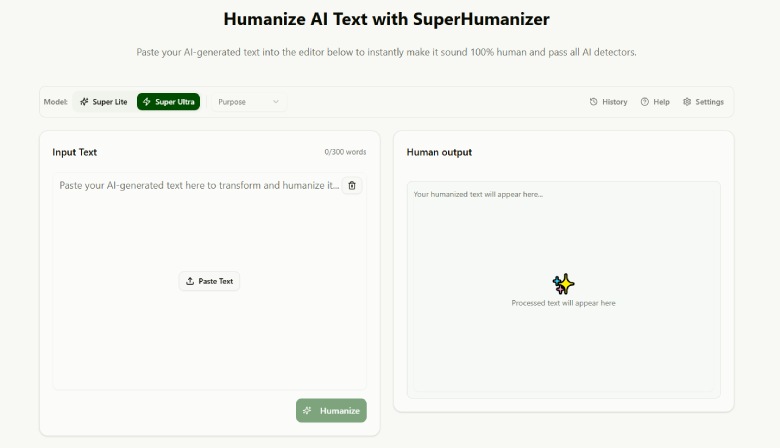
SuperHumanizer is an AI Humanizer that rewrites AI content in a more natural way. It takes your text and improves how it sounds. It removes robotic patterns and adds a human feel.
Many people use it, such as:
-
SEO content writers
-
Bloggers
-
Agencies
-
Copywriters
It works fast and needs no special skills.
How to Use SuperHumanizer to Make AI Text Human?
SuperHumanizer makes AI to Human text conversion really simple. Follow these steps to convert AI text into human style writing with SuperHumanizer.
-
Open the tool (Superhumanizer.ai)
-
Input your AI-flagged text inside the tool.
-
Choose a mode among Super Lite or Super Ultra.
-
Choose the purpose of your text. (Optional)
-
Click the ‘Humanize’ button.
Following these steps, you will get your text converted into human-style writing instantly. If you are not satisfied with the results, Humanize Again. As the tool is completely free to use and there are no usage limits.
Key Features of SuperHumanizer
-
Gives instant results in seconds
-
Keeps the original meaning of your text
-
Offers two modes: Super Lite and Super Ultra
-
Includes a built-in AI content detector
-
Makes text harder for AI detectors to catch
-
Free to use with no limits
-
No signup or account needed
-
Works on all devices and browsers
-
Keeps your data private and secure
Is This Method Good for SEO Content?
Yes, this method can help. First, it makes your content easier to read. This improves user experience.
Second, it helps reduce AI patterns. This may help with AI detection tools.
However, you still need to do some work. You must add keywords in the right places.
Also, you should check the content before publishing.
Tool Method vs Manual Editing
Manual editing gives you full control. You can fix tone, improve flow, and place keywords where they fit best. But it takes time. If your content is long, the process becomes slow.
On the other hand, an AI humanizer works fast. You paste your text and get a better version in seconds. It quickly removes robotic tone and makes the text easier to read.
However, it is not perfect. It may miss small details. It may not handle keywords in the best way.
So, the best approach is simple. Use the AI humanizer first. Then do a quick manual edit. This way, you save time and still keep your content high quality.
Final Talk
The best way to make AI text human is by using AI humanizers like SuperHumanizer. Such tools help you turn robotic text into natural writing. They save time and improve quality.
However, you should not rely on it fully. Always review and edit your content. Use it as a helper, not a replacement. This way, you will get the best results.
FAQs
Can AI text be fully humanized?
Yes, but you still need to review it. Tools help, but human editing is important.
Does humanizing AI content help with SEO?
Yes. It improves readability and user experience, which helps SEO.
Can Google detect AI content after humanizing?
It becomes harder to detect, but no tool gives a 100% guarantee.
Do I still need manual editing after humanizing with tool?
Yes. You should always check and improve your content before publishing.
How to Make AI Text More Human?

Top UI/UX Design Agencies for B2B Websites in 2026

Onboarding Software Trends Every Firm Should Watch

How Last-Mile Delivery Tech Supports eCommerce Growth

Top Domain Registrars with Transparent Renewals