Onboarding Software Trends Every Firm Should Watch
Onboarding is no longer a simple handoff after a contract is signed or an employee accepts an offer. Firms now manage onboarding across clients, vendors, contractors, employees, partners, and remote teams. Each group needs documents, approvals, access, training, identity details, task tracking, and follow-up.
Manual onboarding slows this down. Email threads, shared folders, spreadsheets, and repeated reminders create delays and missed steps.
Modern onboarding tools are moving toward structured workflows, better automation, stronger data control, and more personalized experiences.
Centralized Onboarding Workspaces
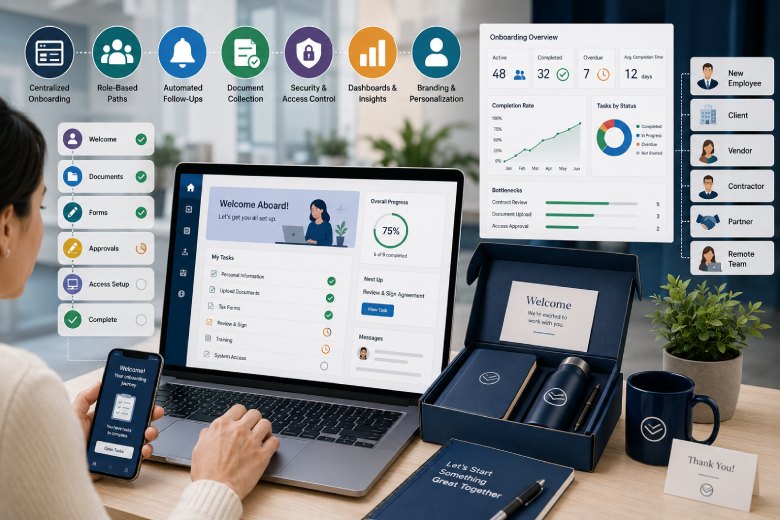
One of the strongest trends is the move toward centralized onboarding pages. Instead of sending instructions across multiple emails, firms can guide participants through one controlled workspace.
A central page can hold tasks, document requests, forms, deadlines, comments, status updates, and next steps.
This makes onboarding easier for both the firm and the person being onboarded.
Teams using onboarding software can reduce scattered communication by keeping task completion, uploads, and follow-ups in one organized workflow.
The result is less chasing and more visibility.
Role-Based Onboarding Paths
Different people need different onboarding paths. A new employee, enterprise client, vendor, freelance designer, legal partner, and board advisor should not receive the same checklist.
Role-based workflows allow firms to adjust tasks by user type, department, service line, location, risk level, and approval requirements.
This reduces irrelevant steps.
It also improves completion rates because participants only see what applies to them.
A strong onboarding system should support templates that can be customized without rebuilding the process each time.
Automation of Repetitive Follow-Ups
Manual reminders waste time. If a client has not uploaded a signed agreement or a new hire has not completed a tax form, staff often follow up by email.
Automation is changing that.
Onboarding tools can now send reminders when tasks are pending, overdue, completed, rejected, or waiting for review.
Follow-Ups Worth Automating
Useful automated reminders include:
-
Missing documents
-
Incomplete forms
-
Pending approvals
-
Upcoming deadlines
-
Overdue training
-
Signature requests
-
Access confirmation
-
Payment setup
-
Compliance steps
Automation reduces administrative pressure without removing human oversight.
Stronger Document Collection
Document collection is one of the most common onboarding bottlenecks. Firms need signed contracts, identification, tax forms, insurance documents, banking details, project briefs, compliance records, and access requests.
A modern onboarding system should make document uploads simple and track which files are missing.
It should also prevent files from being scattered across inboxes.
Secure upload areas, version control, file naming rules, and approval status labels help reduce confusion.
This is especially important for firms handling sensitive client or employee information.
Integrated Approval Workflows
Onboarding often requires several approvals. Legal may review contracts. Finance may confirm payment setup. IT may approve system access. A department lead may confirm role requirements.
When approvals happen outside the onboarding workflow, delays are harder to see.
Integrated approval workflows show who is responsible, what is pending, and when a task is blocked.
Approval Steps to Track
Common approval points include:
-
Contract review
-
Identity verification
-
Budget approval
-
System access
-
Security review
-
Vendor approval
-
Client scope approval
-
Compliance confirmation
-
Final onboarding signoff
Clear approval tracking helps firms avoid silent delays.
Data Security and Access Control
Onboarding involves sensitive data. Firms may collect names, addresses, tax details, contracts, payment records, identification files, passwords, and confidential business information.
Security is now a core onboarding requirement.
The software should support role-based permissions, secure document handling, audit trails, data retention rules, and controlled access.
Only the right people should see sensitive files.
This protects the participant and reduces risk for the firm.
Progress Dashboards for Managers
Managers need visibility without asking for constant updates. Onboarding dashboards can show active workflows, completion rates, overdue tasks, blocked steps, and average time to complete.
This helps firms find process weaknesses.
If most delays happen during contract review, the legal process may need adjustment. If clients often miss upload instructions, the language may need to be clearer.
Dashboards make onboarding measurable instead of anecdotal.
Better Branding and Personalization
Onboarding is part of the firm’s first impression. A confusing or generic process can make a capable firm feel disorganized.
More firms are using branded portals, personalized welcome pages, custom task sequences, and tailored instructions.
This trend also connects with physical welcome kits, client packages, and event materials.
For firms building a consistent onboarding experience, customizable products can support branded items such as notebooks, folders, welcome cards, apparel, or desk accessories that match the digital onboarding process.
The goal is consistency across online and offline touchpoints.
Final Thoughts
Onboarding software trends are moving toward centralized workflows, role-based templates, automated reminders, branded experiences, secure document handling, approval tracking, dashboards, and system integrations.
Firms should watch these trends because onboarding sets the tone for the entire working relationship.
A better onboarding process reduces delays, protects data, improves accountability, and helps teams begin work with more confidence.
When onboarding is structured well, it becomes an operating advantage instead of an administrative burden.








Why HR Teams Should Connect Workforce Planning With Talent Development
Weltrade Broker Review: Examining Its Tools and Trading Environment