Evaluating Software Vendors for Document and Branding Tools: Where a Tool Like StampDy Fits
Anyone using TopFirms to shortlist vendors already understands the core discipline behind good vendor selection: match the tool to the actual job, not to a feature list that sounds impressive on a sales page. That discipline applies just as well to small, single-purpose tools as it does to enterprise software evaluations — and a stamp and document tool called StampDy is a useful case study in exactly that kind of narrow, well-executed fit.
The Problem Being Solved
Every business, at some point, needs an official-looking mark on its documents — a company stamp, a seal, something that turns a plain invoice or contract into a document that visually signals "this is legitimate and it came from us." Historically that meant one of two paths: order a physical rubber stamp from a manufacturer and scan it every time it's needed digitally, or open a general-purpose design tool and manually build a circular layout with curved text, which is more fiddly than it sounds for anyone without design training.
Neither path is efficient for a task that, in practice, needs to happen dozens or hundreds of times a year across invoices, contracts, and internal approvals. That's the specific gap StampDy is built to close, and it's worth walking through how it does that, because the "how" matters more than the marketing copy usually lets on.
What the Tool Actually Does
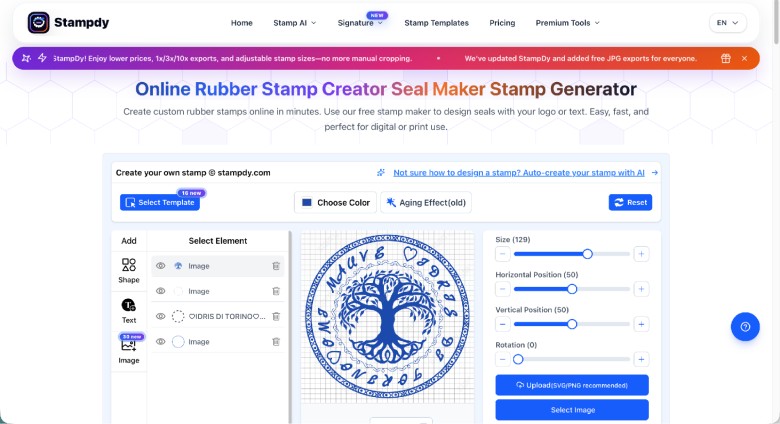
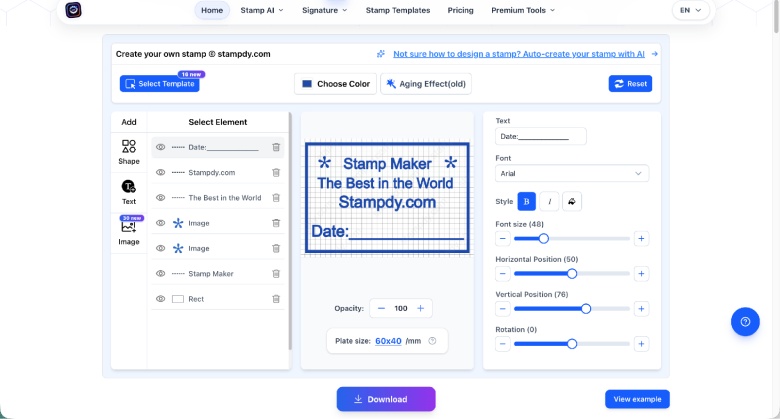
StampDy is a browser-based stamp maker, free to use for the design process itself. Users can choose from round, square, oval, or triangular shapes, then adjust text, fonts, borders, and logos with live previews as they work. No software installation and no account required to start.
The feature most worth flagging for a technically minded audience is the AI auto-create option. Rather than manually placing every element on the stamp — a genuinely tedious process involving curved text alignment that trips up even people with some design background — the AI proposes a starting layout based on what's entered, and the user refines from there. This is a good example of AI applied narrowly and usefully: not generating content wholesale, but eliminating the blank-canvas step that causes most people to abandon self-service design tools in the first place.
Export options are where the tool shows it was built by people who understand both the physical and digital sides of this problem. SVG output gives a scalable vector suitable for actual stamp manufacturing. PNG with a transparent background works for dropping the stamp directly onto digital documents. PDF output is useful for anyone finalizing an official file. EPS supports professional print production for businesses that still want a physical stamp made. And DOCX lets the stamp be inserted directly into a Word document — a small but telling detail, since a surprising number of businesses still route contracts and forms through Word before anything else.
The Document Layer, Not Just the Design Layer
A stamp maker alone would be a fine but limited tool. What makes StampDy more relevant to actual business workflows is that it's paired with a PDF editor in the same product, letting users apply the stamp they just built directly to a document, make quick edits without a full desktop suite, and send out signature requests when a document needs someone else's sign-off.
This closes a loop that a lot of point solutions leave open. Designing a nice stamp image and then having to separately figure out how to place it correctly on a PDF — resizing, positioning, flattening the image into the file — is exactly the kind of two-step process that eats time without anyone noticing how much. Bundling both into one flow is a small architectural decision, but it's the kind that separates a tool that gets used regularly from one that gets tried once and forgotten.
Where This Fits in a Vendor Evaluation
For businesses using a directory like TopFirms to compare service providers and software tools, StampDy occupies a specific, narrow niche: it's not a document management platform, it's not an e-signature enterprise system, and it's not a full design suite. It's a focused tool that does one job — creating and applying a professional stamp — cleanly and without unnecessary complexity.
That narrowness is a legitimate advantage in certain evaluation contexts. A small business or agency that needs to solve exactly this problem, and nothing more, doesn't benefit from paying for or learning a heavier platform built for compliance-heavy document workflows they don't have. StampDy's free design tier and pay-only-on-download model also make it low-risk to test against an actual use case before committing time to it, which is precisely the kind of low-friction evaluation any procurement-minded reader would want.
Being Clear About the Limits
In the interest of giving readers something useful rather than promotional, it's worth being explicit about where StampDy stops. It does not offer audit trails, multi-party approval chains, or the compliance documentation that regulated industries typically require from enterprise e-signature platforms. Organizations with those requirements will still need a dedicated system for that layer of the workflow — StampDy would sit alongside it, handling the visual stamp design specifically, not replacing it.
It's also, deliberately, a lightweight browser tool rather than a full vector design application. Teams needing layered graphic design work beyond stamp creation will hit the tool's ceiling quickly. That's an intentional tradeoff, not an oversight — the product is built to do one thing well rather than many things adequately, which is generally the right call for a tool in this category.
The Broader Software Trend Worth Noting
There's a pattern across smaller SaaS and software tools right now that's easy to miss if you're only looking at big enterprise platforms: the useful innovation isn't always a new feature, it's a removed step. AI auto-create in a stamp tool isn't a headline-grabbing capability, but it reflects the same underlying shift showing up in dozens of adjacent categories — tasks that used to need either a trained person or real design effort are being compressed down to something anyone can finish in a couple of minutes.
For businesses evaluating software vendors, that's a useful lens to apply generally: does this tool remove a real step from a real workflow, or does it just add a feature nobody asked for? StampDy is a clean example of the former.
Trying It
There's no cost barrier to testing StampDy — design is free, templates are available for anyone who'd rather start from a template than a blank shape, and the AI auto-create option removes most of the initial setup friction. Export formats cover both physical stamp production and digital document use, so there's no need to commit to one path before trying the tool.
It's available directly at stampdy.com.
Website: https://stampdy.co

The Ultimate Guide to React.js Development for Modern Businesses

6 Tactics That Actually Lift Workflow App Adoption


5 Best Digital Marketing Institutes in Jaipur: 2026 Guide